1. MyBatis的Dao层实现 1.1 传统开发方式
编写UserDao接口
1
2
3
public interface UserDao { List<User> findAll () throws IOException; }
编写UserDaoImpl实现
1
2
3
4
5
6
7
8
9
10
public class UserDaoImpl implements UserDao { public List<User> findAll () throws IOException { InputStream resourceAsStream = Resources.getResourceAsStream("SqlMapConfig.xml" ); SqlSessionFactory sqlSessionFactory = new SqlSessionFactoryBuilder ().build(resourceAsStream); SqlSession sqlSession = sqlSessionFactory.openSession(); List<User> userList = sqlSession.selectList("userMapper.findAll" ); sqlSession.close(); return userList; } }
. 测试传统方式
1
2
3
4
5
6
@Test public void testTraditionDao () throws IOException { UserDao userDao = new UserDaoImpl (); List<User> all = userDao.findAll(); System.out.println(all); }
1.2 代理开发方式
代理开发方式介绍
采用 Mybatis 的代理开发方式实现 DAO 层的开发,这种方式是我们后面进入企业的主流
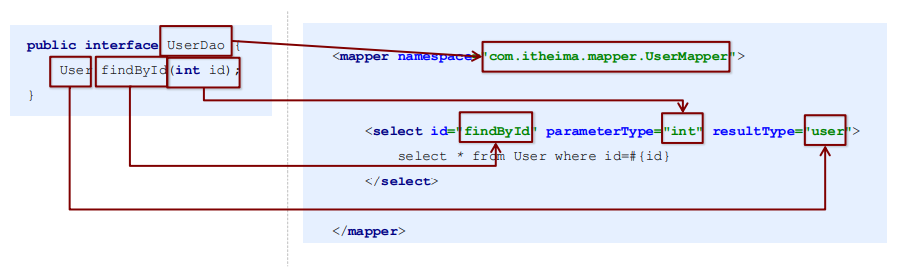
Mapper 接口开发方法只需要程序员编写Mapper 接口(相当于Dao 接口),由Mybatis 框架根据接口定义创建接 口的动态代理对象,代理对象的方法体同上边Dao接口实现类方法
Mapper 接口开发需要遵循以下规范:
Mapper.xml文件中的namespace与mapper接口的全限定名相同
Mapper接口方法名和Mapper.xml中定义的每个statement的id相同
Mapper接口方法的输入参数类型和mapper.xml中定义的每个sql的parameterType的类型相同
Mapper接口方法的输出参数类型和mapper.xml中定义的每个sql的resultType的类型相同
编写UserMapper接口
UserDao 指的是 namespace 的位置
测试代理方式
1
2
3
4
5
6
7
8
9
10
11
@Test public void testProxyDao () throws IOException { InputStream resourceAsStream = Resources.getResourceAsStream("SqlMapConfig.xml" ); SqlSessionFactory sqlSessionFactory = new SqlSessionFactoryBuilder ().build(resourceAsStream); SqlSession sqlSession = sqlSessionFactory.openSession(); UserMapper userMapper = sqlSession.getMapper(UserMapper.class); User user = userMapper.findById(1 ); System.out.println(user); sqlSession.close(); }
2. MyBatis映射文件深入 2.1 动态sql语句
动态sql语句概述
Mybatis 的映射文件中,前面我们的 SQL 都是比较简单的
有些时候业务逻辑复杂时,我们的 SQL是动态变化的, 此时在前面的学习中我们的 SQL 就不能满足要求了
动态 SQL 的使用
if foreach
我们根据实体类的不同取值,使用不同的 SQL语句来进行查
比如在 id如果不为空时可以根据id查询,如果username 不同空时还要加入用户名作为条件
这种情况在我们的多条件组合查询中经常会碰到
当查询条件只有id存在时,控制台打印的sql语句如下:
1 2 3 4 5 6 7 8 9 10 11 <select id ="findByCondition" parameterType ="user" resultType ="user" > select * from User <where > <if test ="id!=0" > and id=#{id} </if > <if test ="username!=null" > and username=#{username} </if > </where > </select >
当查询条件id和username都存在时,控制台打印的sql语句如下:
1 2 3 4 5 6 UserMapper userMapper = sqlSession.getMapper(UserMapper.class);UserMapper un = new User ();condition.setId(1 ); condition.setUsername("lucy" ); User user = userMapper.findByCondition(condition);
1 select * from User WHERE id = ? and username = ?
当查询条件只有id存在时,控制台打印的sql语句如下:
1 2 3 4 5 UserMapper userMapper = sqlSession.getMapper(UserMapper.class);User condition = new User ();condition.setId(1 ); User user = userMapper.findByCondition(condition);
1 select * from User WHERE id = ?
循环执行sql的拼接操作,例如:SELECT * FROM USER WHERE id IN (1,2,5)。
1 2 3 4 5 6 7 8 <select id ="findByIds" parameterType ="list" resultType ="user" > select * from User <where > <foreach collection ="array" open ="id in(" close =")" item ="id" separator ="," > #{id} </foreach > </where > </select >
测试代码片段如下:
1 2 3 4 5 UserMapper userMapper = sqlSession.getMapper(UserMapper.class);int [] ids = new int []{2 ,5 };List<User> userList = userMapper.findByIds(ids); System.out.println(userList);
1 select * form User WHERE id in(?,?)
foreach标签的属性含义如下:
< foreach>标签用于遍历集合,它的属性:
collection:代表要遍历的集合元素,注意编写时不要写#{}
open:代表语句的开始部分
close:代表结束部分
item:代表遍历集合的每个元素,生成的变量名
sperator:代表分隔符
2.2 SQL片段抽取
Sql 中可将重复的 sql 提取出来,使用时用 include 引用即可,最终达到 sql 重用的目的
1 2 3 4 5 6 7 8 9 10 11 12 13 14 15 <sql id ="selectUser" > select * from User</sql > <select id ="findById" parameterType ="int" resultType ="user" > <include refid ="selectUser" /> where id=#{id} </select > <select id ="findByIds" parameterType ="list" resultType ="user" > <include refid ="selectUser" /> <where > <foreach collection ="array" open ="id in(" close =")" item ="id" separator ="," > #{id} </foreach > </where > </select >
2.3 MyBatis映射文件配置(小结)
标签
解释
<select>查询
<insert>插入
<update>修改
<delete>删除
<where>where条件
<if>if判断
<foreach>循环
<sql>sql片段抽取
<include>插入
3. MyBatis核心配置文件深入 3.1 typeHandlers标签
数据类型
Java类型
JDBC类型
BoolenaTypeHandlerjava.lang.Boolean,boolean数据库兼容的BOOLEAN
ByteTypeHanderjava.lang.Byte,yte数据库兼容的NUMERIC或BYTE
ShortTypeHanderjava.lang.Short,short数据库兼容的NUMERIC或SHORT INTEGER
IntegerTypeHanderjava.lang.Integer,int数据库兼容的NUMERIC或INTEGER
LongTypeHanderjava.lang.Long,long数据库兼容的NUMERIC或LONG INTEGER
你可以重写类型处理器或创建你自己的类型处理器来处理不支持的或非标准的类型
具体做法为:实现 org.apache.ibatis.type.TypeHandler 接口, 或继承一个很便利的类 org.apache.ibatis.type.BaseTypeHandler, 然后可以选择性地将它映射到一个JDBC类型
例如需求:一个Java中的Date数据类型,我想将之存到数据库的时候存成一 个1970年至今的毫秒数,取出来时转换成java的Date
开发步骤:
定义转换类继承类BaseTypeHandler
覆盖4个未实现的方法,其中setNonNullParameter为java程序设置数据到数据库的回调方法,getNullableResult 为查询时 mysql的字符串类型转换成 java的Type类型的方法
在MyBatis核心配置文件中进行注册
测试转换是否正确
1
2
3
4
5
6
7
8
9
10
11
12
13
14
15
16
17
18
public class MyDateTypeHandler extends BaseTypeHandler <Date> { public void setNonNullParameter (PreparedStatement preparedStatement, int i, Date date, JdbcType type) { preparedStatement.setString(i,date.getTime()+"" ); } public Date getNullableResult (ResultSet resultSet, String s) throws SQLException { return new Date (resultSet.getLong(s)); } public Date getNullableResult (ResultSet resultSet, int i) throws SQLException { return new Date (resultSet.getLong(i)); } public Date getNullableResult (CallableStatement callableStatement, int i) throws SQLException { return callableStatement.getDate(i); } }
1 2 3 4 <typeHandlers > <typeHandler handler ="cn.jyw.typeHandlers.MyDateTypeHandler" > </typeHandler > </typeHandlers >
3.2 plugins标签
MyBatis可以使用第三方的插件来对功能进行扩展,分页助手PageHelper是将分页的复杂操作进行封装,使用简单的方式即 可获得分页的相关数据
开发步骤:
导入通用PageHelper的坐标
在mybatis核心配置文件中配置PageHelper插件
测试分页数据获取
导入通用PageHelper坐标
1 2 3 4 5 6 7 8 9 10 11 <dependency > <groupId > com.github.pagehelper</groupId > <artifactId > pagehelper</artifactId > <version > 3.7.5</version > </dependency > <dependency > <groupId > com.github.jsqlparser</groupId > <artifactId > jsqlparser</artifactId > <version > 0.9.1</version > </dependency >
在mybatis核心配置文件中配置PageHelper插件
1 2 3 4 5 <plugin interceptor ="com.github.pagehelper.PageHelper" > <property name ="dialect" value ="mysql" /> </plugin >
测试分页代码实现
1
2
3
4
5
6
7
8
9
@Test public void testPageHelper () { PageHelper.startPage(1 ,2 ); List<User> select = userMapper2.select(null ); for (User user : select){ System.out.println(user); } }
获得分页相关的其他参数
1 2 3 4 5 6 7 8 PageInfo<User> pageInfo = new PageInfo <User>(select); System.out.println("总条数:" +pageInfo.getTotal()); System.out.println("总页数:" +pageInfo.getPages()); System.out.println("当前页:" +pageInfo.getPageNum()); System.out.println("每页显示长度:" +pageInfo.getPageSize()); System.out.println("是否第一页:" +pageInfo.isIsFirstPage()); System.out.println("是否最后一页:" +pageInfo.isIsLastPage());
3.3 MyBatis核心配置文件常用标签:
properties标签:该标签可以加载外部的properties文件
typeAliases标签:设置类型别名
environments标签:数据源环境配置标签
typeHandlers标签:配置自定义类型处理器
plugins标签:配置MyBatis的插件
mapers标签:加载映射文件

 微信
微信 支付宝
支付宝